Under the Hood of Google Vids: How Real-Time Video Personalization and Neural Avatars Work
Introduction to Google Vids: A New Era of AI Video Creation
Video has always been the ultimate storytelling medium, but producing it traditionally required complex software and hours of tedious editing. Enter Google Vids, the newest addition to the Google Workspace AI ecosystem designed to completely democratize video creation. It turns any professional into a capable writer, producer, and editor right from their browser.
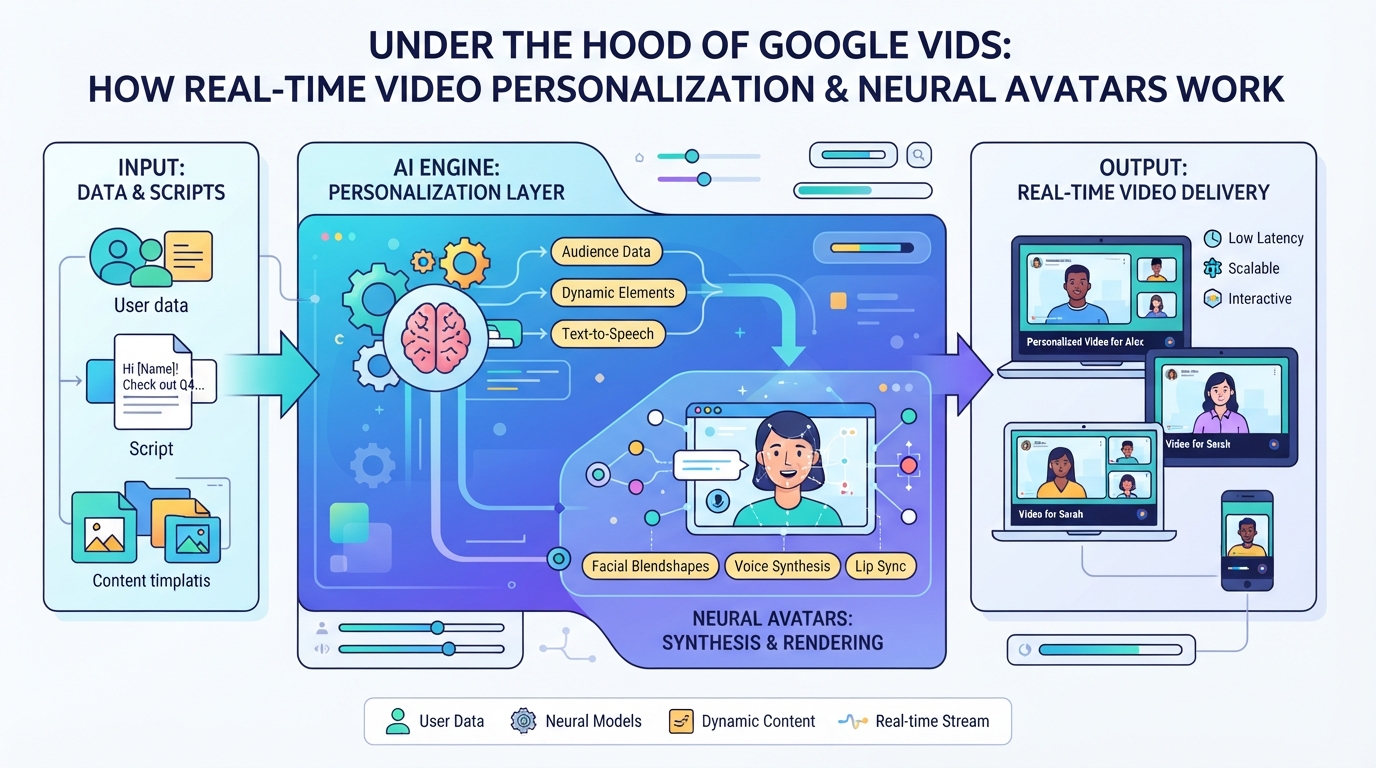
But this isn’t just another basic slide-to-video template tool. Under the hood, Google Vids AI leverages sophisticated machine learning models to handle the creative heavy lifting.
Here is the core engine driving this new era of production:
- Neural Avatars: Photorealistic AI presenters that deliver your script with natural expressions and human-like cadence.
- Real-Time Personalization: The ability to dynamically tailor video assets and messaging to specific viewers instantly.
- Generative AI Workflows: Automated storyboarding, scriptwriting, and instant audio mixing that eliminate manual keyframing.
Let’s dive deep into how this technology actually works under the hood.
The Generative AI Pipeline: Leveraging Gemini for Scripts and Storyboards
It all starts with a simple prompt. When you tell Google Vids AI what you want to create—say, a product launch announcement or a training recap—the platform immediately hands the creative reins to Gemini.
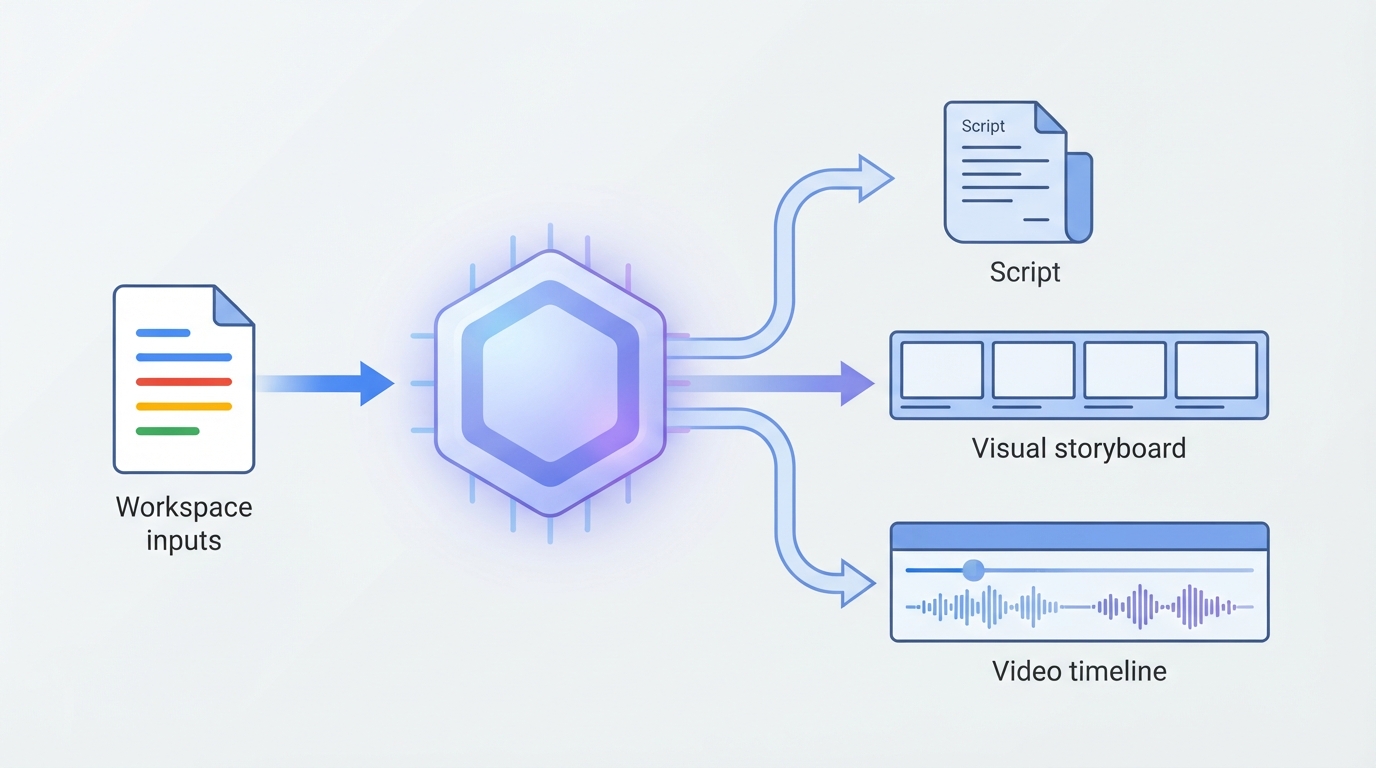
This Gemini video generation pipeline works in three rapid-fire phases:
1. Contextual Ingestion: Gemini analyzes your prompt, pulling key data from linked Google Workspace documents (like Docs or Slides) to establish the core message.
2. Script & Structure Drafting: It instantly outputs a fully realized, multi-scene script, organizing your narrative arc with professional pacing.
3. Visual Storyboarding: Gemini maps each script beat to a visual storyboard, suggesting matching stock footage, layout styles, and background tracks.
Instead of staring at a blank timeline, you get a cohesive, editable blueprint in seconds. It’s the ultimate bridge from raw idea to structured video, transforming unstructured text into a production-ready framework before you even hit “record.”
Deep Dive into Neural Avatars: Lifelike Digital Presenters
Once your storyboard is locked, Google Vids lets you bring your script to life using Neural Avatars. These highly realistic AI digital presenters eliminate the need for expensive cameras, studio setups, or multiple voice takes.
To achieve this lifelike quality, Google trains advanced deep-learning models on proprietary, high-resolution datasets of real actors. Instead of stiff, robotic movements, the technology delivers fluid motion through a two-step synchronization process:
- Audio-to-Expression Mapping: The neural network analyzes the script’s audio track, predicting natural micro-expressions, eye blinks, and subtle head tilts.
- Phoneme-to-Viseme Matching: It translates spoken sounds (phonemes) into corresponding mouth shapes (visemes) for precise, frame-accurate lip synchronization.
This ensures your digital presenter speaks with a natural cadence, matching the emotional tone of your message without any uncanny valley awkwardness.
The Infrastructure Powering the Tech: Google TPUs and Cloud Rendering
Creating lifelike avatars and syncing audio in real-time requires massive computational power. If your local computer tried to process these assets, it would likely freeze, crash, or overheat.
That is where Google Vids AI shifts the heavy lifting entirely to the cloud. By leveraging Google’s proprietary Tensor Processing Units (TPUs), the platform bypasses your local hardware limits completely.
Here is how this advanced backend infrastructure handles the workload:
- TPU cloud rendering: Compiles complex, multi-layer video tracks instantly, ensuring smooth playback without any local rendering lag.
- Dynamic TTS Processing: Generates high-fidelity text-to-speech audio and matches it to neural avatars on the fly.
- Global Scalability: Distributes the processing load across Google’s global data centers for rapid, on-demand video creation.
This powerhouse setup means you can render a highly personalized, high-definition video in seconds, whether you are working on a high-end workstation or a budget Chromebook.
Real-Time Video Personalization: Google Vids vs. Enterprise Alternatives
While Google Vids excels at collaborative, template-driven creation within Workspace, it takes a different approach to real-time video personalization than enterprise-grade powerhouses like Synthesia, HeyGen, and Tavus. Google Vids is built for rapid, internal team communication rather than hyper-personalized external marketing campaigns.
Here is how Vids stacks up against dedicated competitors:
- Dynamic Variables: Platforms like Tavus and HeyGen allow you to feed database variables (like a customer’s name) directly into video scripts for automated, video personalization at scale. Google Vids currently lacks this deep programmatic API integration.
- Custom Avatars: Synthesia and HeyGen let you clone your own voice and likeness with studio-grade precision. Google Vids relies on pre-built, templated avatars, limiting your ability to create highly customized digital twins.
Essentially, Google Vids democratizes quick video creation for the office, while enterprise alternatives remain the go-to for programmatic, customer-facing video campaigns.
Security and Enterprise Scalability
Moving beyond basic slide-to-video conversions, true enterprise deployment requires a robust infrastructure that Google Vids AI isn’t yet built to handle.
When you are deploying video personalization at scale, data security is paramount. Professional-grade platforms secure sensitive customer data with SOC 2 Type II compliance, GDPR alignment, and strict biometric data protection for voice and likeness clones.
Here is what separates dedicated enterprise video engines from basic productivity suites:
- Rendering Speed: Dedicated engines leverage distributed GPU pipelines to generate thousands of personalized videos in minutes, whereas standard office suites queue and delay renders.
- Voice Cloning Accuracy: Advanced tools utilize high-fidelity neural networks to capture subtle emotional inflections, completely avoiding the “uncanny valley” effect.
- Deepfake Mitigation: Enterprise platforms implement strict verification protocols and digital watermarking to ensure cloned assets are never weaponized.
Ultimately, while built-in tools keep internal teams connected, enterprise engines provide the security and horsepower needed for the public stage.
Conclusion: The Future of Collaborative AI Video
Google Vids AI represents a massive shift in how we communicate at work, transforming static documents into dynamic, living media. By embedding video creation directly into the productivity suite, it democratizes high-production storytelling for everyday teams.
As the technology matures, we can expect Neural Avatars to evolve from pre-recorded presenters into real-time, interactive facilitators. Here is how this landscape will shift to meet future enterprise demands:
- Hyper-Localization: Instant translation and cultural adaptation of body language for global audiences.
- Dynamic Data Integration: Videos that update their own charts and voiceovers in real time as underlying spreadsheets change.
- Biometric Security: Advanced cryptographic watermarking to guarantee avatar authenticity and prevent unauthorized use.
Ultimately, the future of work isn’t just about writing or reading—it’s about generating. With these cognitive tools at our fingertips, the next generation of collaboration will be fully animated, highly personalized, and rendered on demand.